ssh
Configure ssh keys
- https://kb.iu.edu/d/aews
- https://www.cyberciti.biz/faq/how-to-set-up-ssh-keys-on-linux-unix/
- https://nerderati.com/2011/03/17/simplify-your-life-with-an-ssh-config-file/
Understand key management
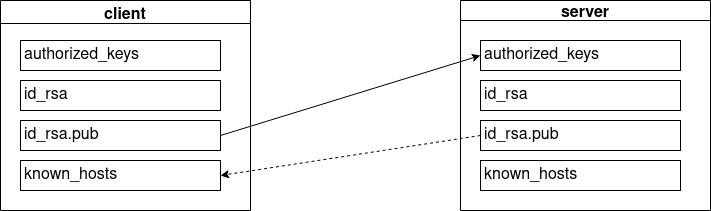
Generating and sharing keys
The client generate its own key pair.
- Its private key shal remain private, not comprimized, not duplicated elswhere. it should be secured with a passphrase to guarantee that only the owner can use it.
- The client copies its public key on the server (using the tool ssh-copy-id). When the key is copied, the server trusts the client. It will then consider the client key an "authorized_key".
Remote login
The client execute ssh to server hostname using a specific username (the one associated with the key).
The server uses the public key to encrypt a message that the client will decrypt with its private key. The client send back this message to the server. the server knows the client realy owns its private key (the identity of the client is confirmed).
During the first login, the client stored the server's pub_key to remember this server.
Key management
A client machine (a personal computer) has typically:
- One private / public key pair (stored in id_rsa, id_rsa.pub)
- Every server known bu the client has its public key stored in "know_hosts"
A server machine has typically: - One private / public key pair (stored in id_rsa, id_rsa.pub) - A list of public keys, each one belongs to a client autorized to acces the server, stored in "authorized_keys"
webmin
installation (ubuntu 18)
sudo sh -c 'echo "deb http://download.webmin.com/download/repository sarge contrib" > /etc/apt/sources.list.d/webmin.list'
wget -qO - http://www.webmin.com/jcameron-key.asc | sudo apt-key add -
sudo apt-get update
sudo apt-get install webmin
sudo ufw allow 10000/tcp
serveur monitoring
nmon
glances
x11vnc
Configurations
côté server: installer x11vnc
apt install x11vnc
configurer server ssh
X11Forwarding yes
option X11 config (pour autoriser lancer startx depuis ssh)
nano /etc/X11/Xwrapper.config
allowed_users = anybody
Avec session graphique ouverte sur le server
côté server Démarrer une sessiosn graphique avec xorg lancer x11vnc sur le server (éventuellement via ssh depuis le client)
x11vnc
côté client avec remmina (ou autre client vnc) lancer session vnc avec l'ip du server (eventuellement préciser port si différent de 5900)
Sans session graphique ouverte sur le server
problème: VNC duplique un bureau (le bureau d'un utilisateur déja loggé dans une session graphique). il faudrait pouvoir lancer une session graphique à distance (startx) mais ne fonctionne pas si pas root. solution:
configurer l'utilisateur en autologin after reboot redémarrer le server (la session graphique se lance)
lancer x11vnc sur le server (via ssh depuis le client)
x11vnc
côté client vnc://server_ip:5900
lancer une seule application (sans session server)
ssh -X <username>@<host> gedit &
-X Enables X11 forwarding. This can also be specified on a per-host basis in a configuration file.
    X11 forwarding should be enabled with caution.  Users with the
    ability to bypass file permissions on the remote host (for the
    user's X authorization database) can access the local X11
    display through the forwarded connection. An attacker may then
    be able to perform activities such as keystroke monitoring.
Check /etc/ssh/sshd_config on the server side:
sudo nano /etc/ssh/sshd_config
for the lines below:
X11Forwarding yes
X11UseLocalhost no
Restart the ssh srever, if you have made changes:
sudo service ssh restart
Check /etc/ssh/ssh_config on the client side:
sudo nano /etc/ssh/ssh_config
for the lines below
ForwardX11 yes
ForwardX11Trusted yes